What a payment register is
A payment register is a running record of the payments your business receives from customers: one line per payment, saying what it was for, how the customer paid, and who on your team took it. (It's not the accounts payable kind of payment register, which lists the bills a business pays out.)
Many offices keep this record on an old cash register, in a paper receipt book, or in a shared spreadsheet. Each works until several people need to use it at once, or until someone has to add it all up at the end of the month.
How it works
1. Set up your categories and payment methods
Categories are what customers pay you for: the services and products you sell, like the buttons on a cash register. Payment methods are how they pay: Cash, Check, Card, and anything else you accept, such as money orders or patient financing. You name both during a five-minute setup and can change them any time in Settings.
2. Record each payment as it comes in
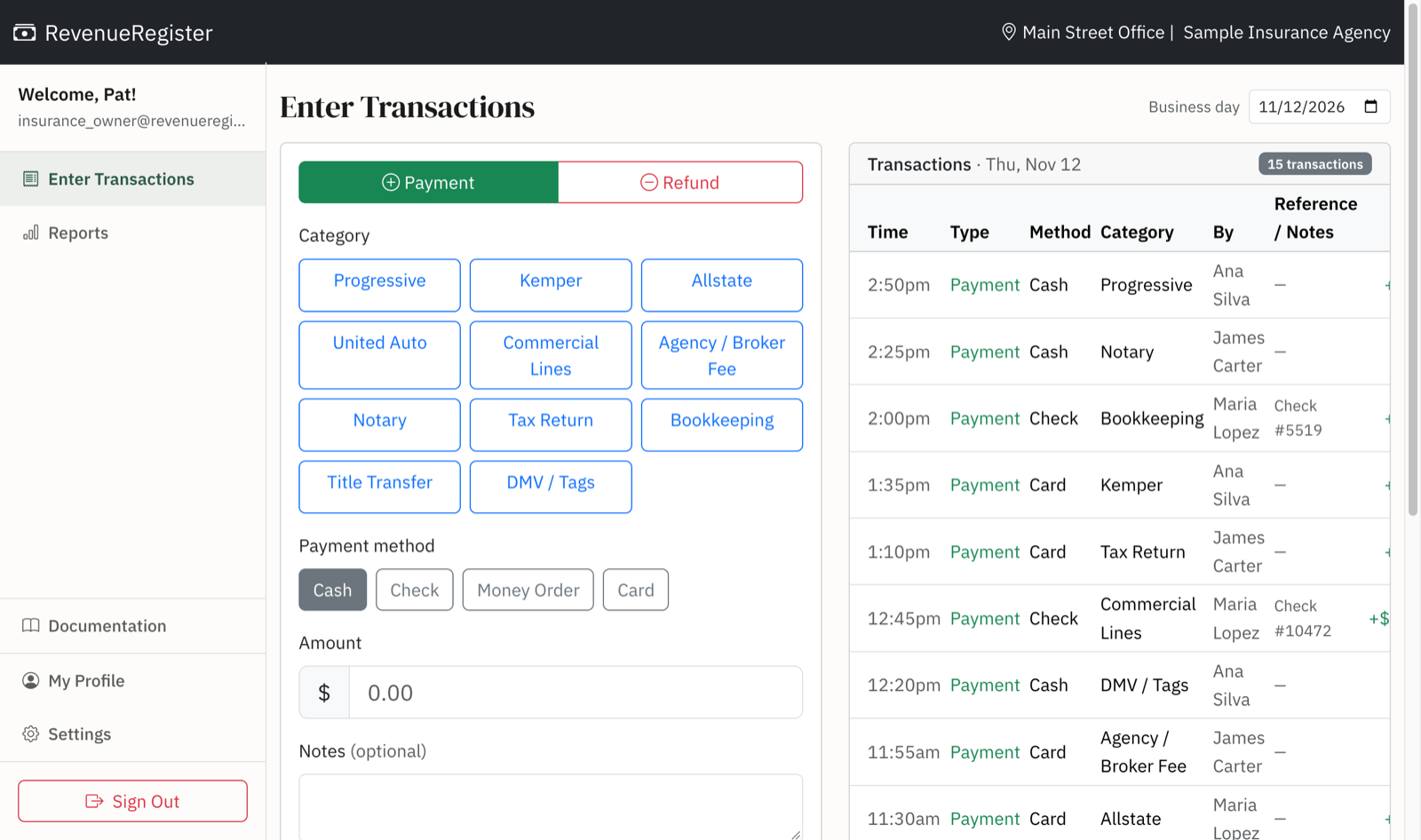
On the Enter Transactions screen, staff tap a category, tap a payment method, type the amount, and press Record. There's an optional field for a check or reference number and a notes field. Refunds work the same way. The payment appears in the day's list immediately, with the name of the person who recorded it.
3. Close out the day with one report
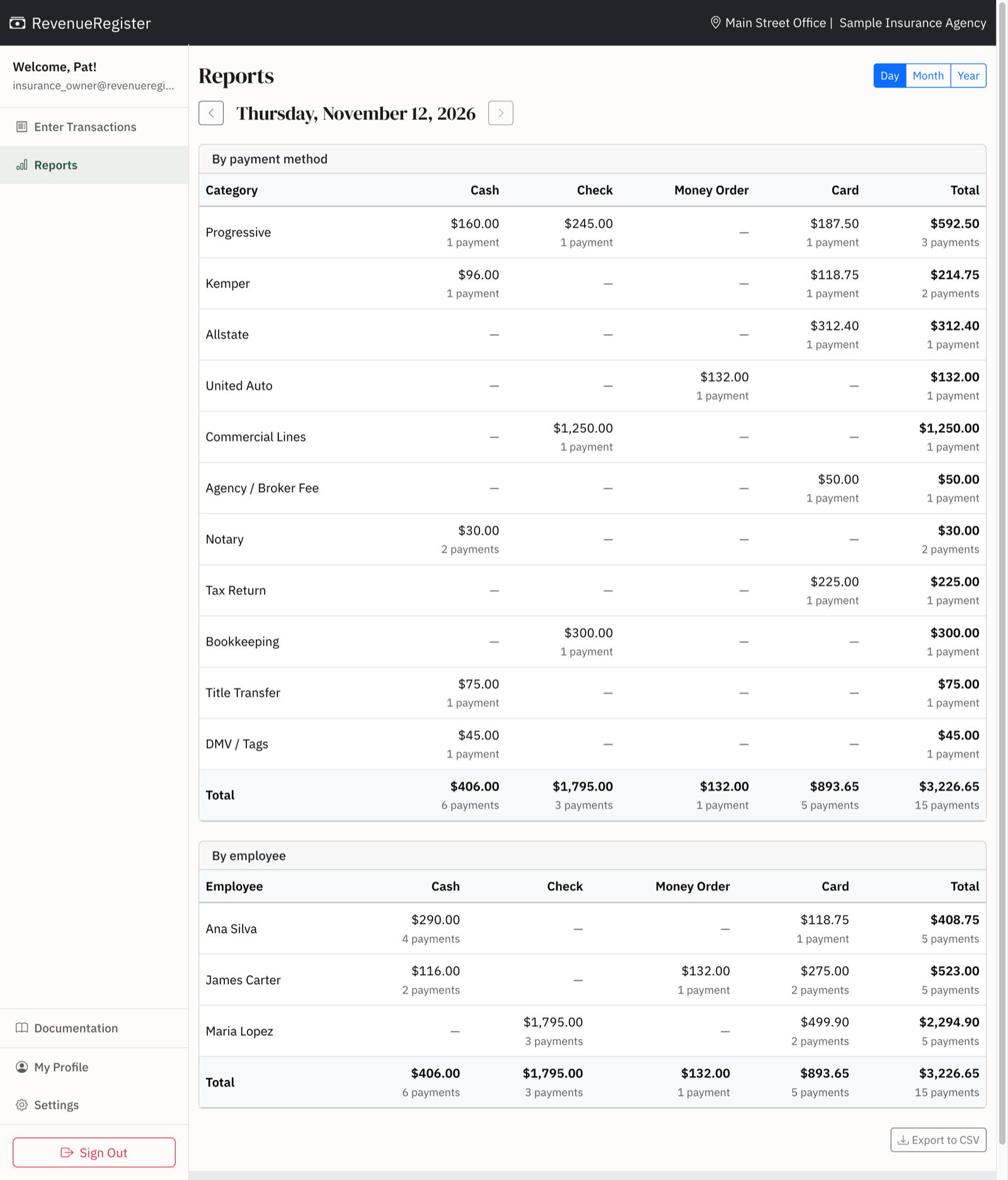
The day view of Reports shows totals by category and payment method, side by side, plus a by-employee table. Compare the card total to your processor's batch and the cash and check totals to your deposit. Click any total to see the payments behind it.
4. Get monthly and yearly totals without re-keying
Month and year views total every category and payment method automatically. Filter by employee, and export any view to CSV for your bookkeeper or accountant.
Corrections without losing the trail
Managers and admins fix mistakes by editing or deleting a payment from Reports. Every change is written to the audit log with who made it and when. Regular staff can record payments but can't change them afterward, which closes the easiest way for money to go missing.
One location or many
Each location has its own categories, payment methods, and reports. Owners and admins switch between locations from one login, while managers and staff see only their own. Pricing is per location, with unlimited users.
With or without a cash drawer
During setup, RevenueRegister asks whether you keep a cash drawer. If you don't, cash is simply another payment method. If you do, staff open the drawer with a starting count, take cash through it, and close it with a count that shows whether the drawer came out over or short. Our guide to balancing a cash drawer at the end of each shift covers the routine in detail.
Who uses it
Any business with a front desk that takes payments for more than one kind of service. For example, insurance agencies that also offer notary, tax, and DMV services set up a category for each carrier and each walk-in service, then see each CSR's payments at close.
Auto repair shops split Labor, Parts, Tires, and State Inspection so a returned part comes out of parts revenue. Veterinary clinics track Exams, Vaccinations, Surgery, and Boarding and can see how much boarding was paid by check. Salons and barbershops record Haircut, Color, and Retail Products and see each stylist's day.
Dental practices track copays, CareCredit, and insurance checks by procedure and count the cash drawer at every close, or enter daily totals from their practice management system instead. Tax preparation offices, tag and title agencies, and studios use it the same way.
Set up in five minutes
- Create your account and say whether you keep a cash drawer.
- Name your payment methods and categories.
- Try it in Test Mode, where nothing you record is permanent.
- Invite your team by email.
- Start your 14-day free trial.