One counter, a dozen kinds of payment
A retail agency's front desk is busy in a way most software doesn't plan for. One customer puts down the first payment on a Progressive auto policy, the next pays a monthly installment on a Kemper policy in cash, and the one after that needs a document notarized and a title transferred. Commercial clients drop off checks. Some customers pay with a money order.
RevenueRegister records each of those as one line in a payment register that tracks what was paid for, how it was paid, and who took it, so the totals you need at the end of the day and the end of the month are already added up.
Set up categories the way your office already thinks
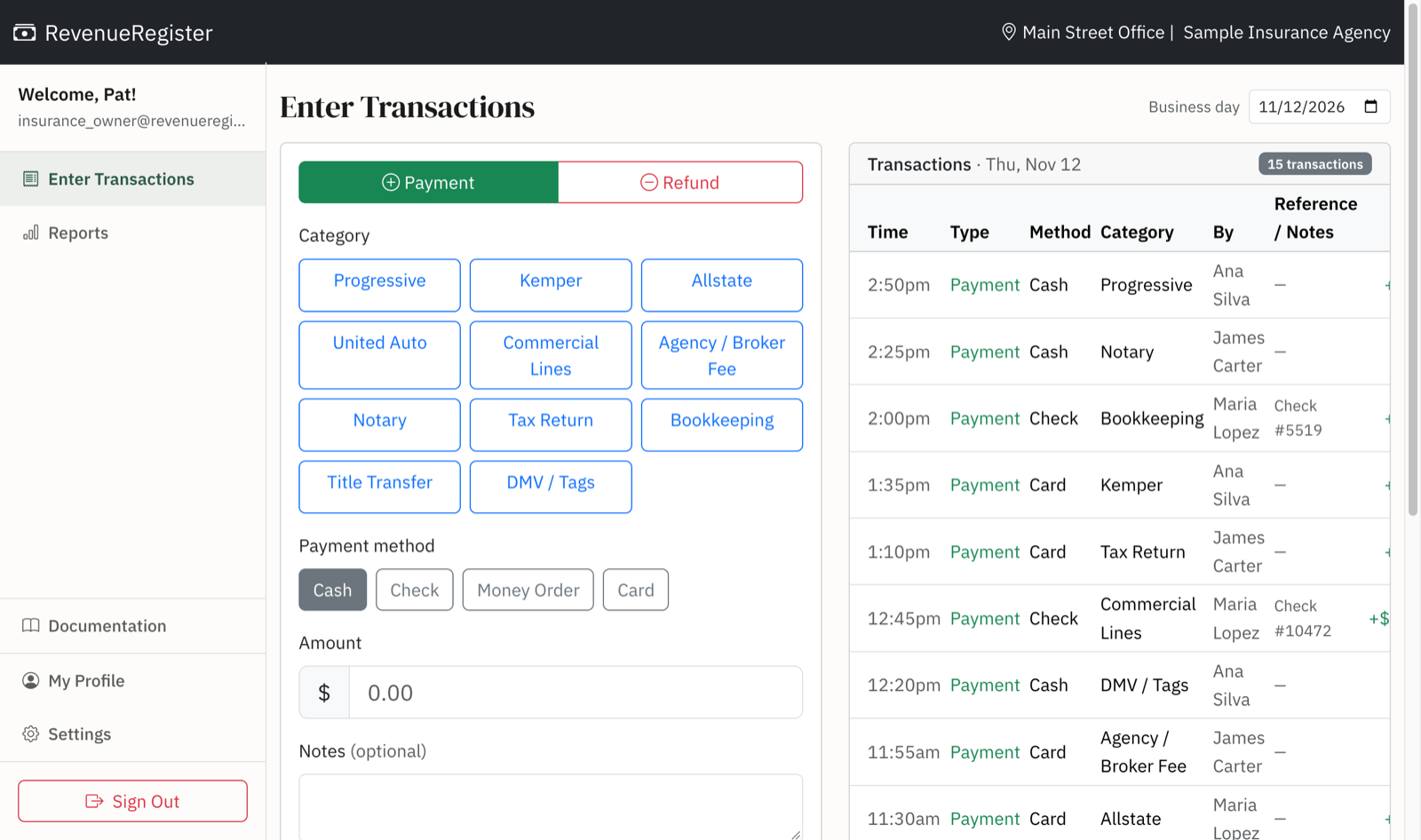
If you're coming from a cash register, you already have a button for each kind of payment. In RevenueRegister those are called categories, and you name them yourself. Most agencies make one for each carrier they take payments for, plus one for each walk-in service. For example:
- Carriers: Progressive, Kemper, Allstate, United Auto, and Commercial Lines for business policies
- Agency income: Agency / Broker Fee
- Walk-in services: Notary, Tax Return, Bookkeeping, Title Transfer, DMV / Tags
Payment methods are separate from categories, so a check for a Kemper premium and cash for a Kemper premium both land under Kemper. Agencies typically use Cash, Check, Money Order, and Card. Each entry has an optional Transaction ID field for the check or money order number, which makes deposit day much easier.
Every CSR on their own computer, one report for the office
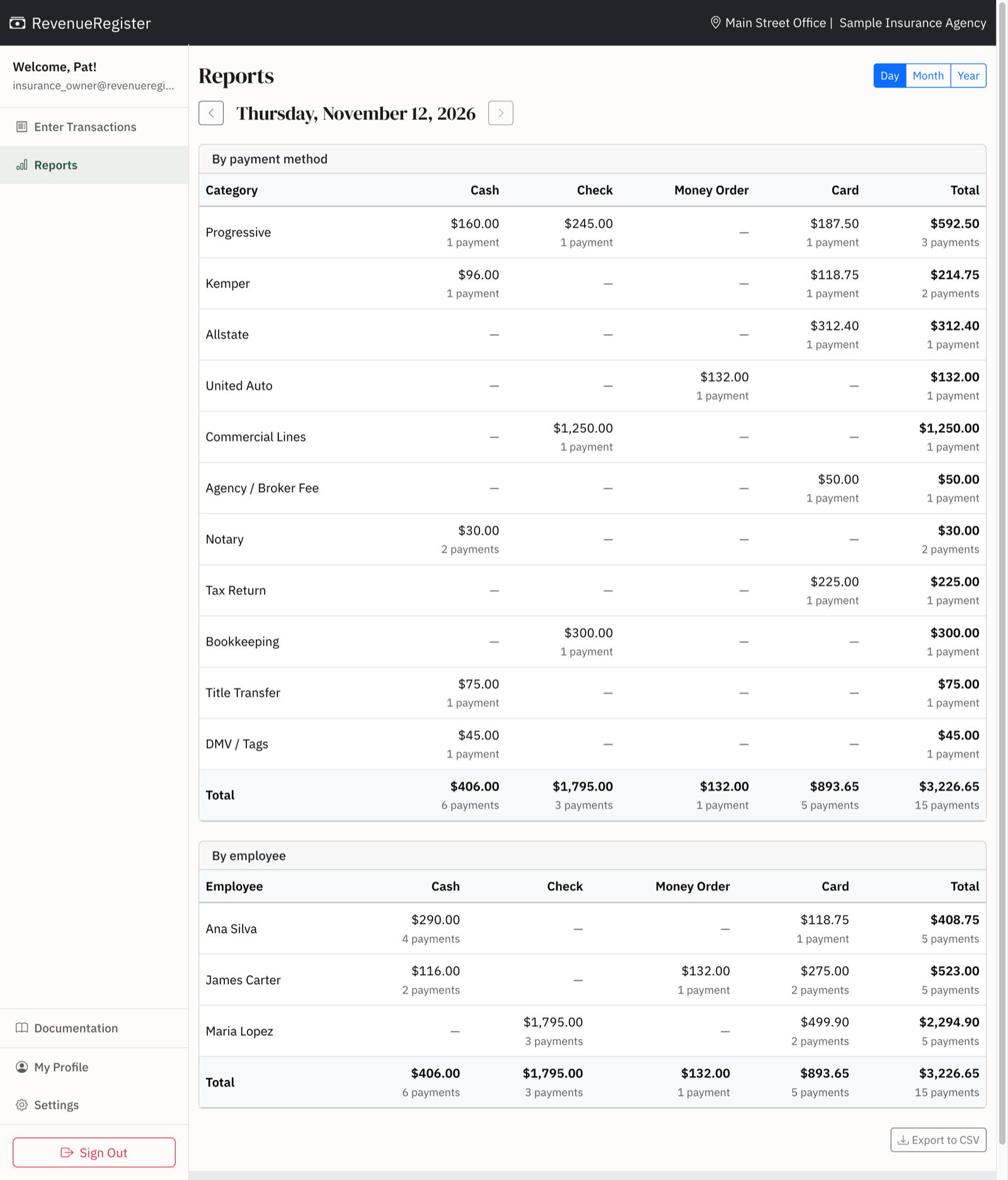
CSRs record payments from their own desks in a browser; there's nothing to install and no shared terminal to wait for. Each entry shows up immediately in the day's list, with the CSR's name on it. At close, the day view of Reports shows totals by category and payment method, plus a by-employee table, so you can see at a glance that Maria took six Progressive payments and two notary fees while the front counter took the cash tag renewals.
Closing out the day
The end-of-day report replaces the register tape. Compare its Card total to your processor's batch, its Cash, Check, and Money Order totals to the deposit slip, and its carrier totals to what was posted in your agency management system. If something's off, you can drill into any total to see the payments behind it.
Mistakes get fixed without losing the trail. Managers can edit or delete a payment from Reports, and every change is written to the audit log. Regular staff can record payments but can't change them afterward.
Month-end without re-keying the tape
Month and year views total every category and payment method automatically. You can see what each carrier brought in, how much came from notary and tax work, and how the month compares to the last one. Filter by employee if you track production by CSR, and export any view to CSV for your bookkeeper.
One office or several
Each location keeps its own categories, payment methods, and daily report, so an office that handles tag and title work can have categories the others don't. Owners and admins switch between offices from one login. Office managers see only their own office. Pricing is per location, so opening a branch means adding a location, not buying another register.
Cash drawer optional
Most agencies don't need to count a drawer at every shift change. When you sign up, answer "No" to keeping a cash drawer and cash becomes just another payment method. If your office takes a lot of cash, keep drawer tracking on: staff open and close a drawer with a count, every close shows whether it came out over or short, and owners and managers get an email the next morning about any register left open or any drawer off by more than $50.
Replacing a cash register
Plenty of agencies still ring up payments on a cash register they bought more than a decade ago, then add up the tape at close and type the totals into a spreadsheet. Only one person can use it at a time, it can't tell you who took a payment, and when it breaks, finding parts or someone to program it gets harder every year.
Moving over takes an afternoon. Write down the buttons you use on your register for each carrier and service, enter them as categories, invite your CSRs, and run RevenueRegister in Test Mode next to the old register for a few days until the totals match.
Replacing a spreadsheet
Other agencies keep a shared spreadsheet with a row for every payment. It works until two CSRs have it open at once, someone sorts one column and not the others, or a formula gets typed over and the month's totals quietly stop adding up. There's no record of who changed what, so a missing payment is hard to trace.
RevenueRegister keeps the same information, with the date, carrier or service, payment method, amount, and who took it, but nobody can type over a total or edit a past entry without it showing in the audit log. Set up the categories you already use as column or row headings, and the daily and monthly totals you used to build with formulas are already there in Reports. If your bookkeeper still wants a spreadsheet, export any report to CSV.