Free Cash Register Template Spreadsheet
A Google Sheets template based on a spreadsheet used for over 20 years to track cash at multiple retail locations — free from RevenueRegister.
Open the Free Template →About This Free Spreadsheet
RevenueRegister is providing this template free of charge. It is based on a spreadsheet that we used for over 20 years to track cash at multiple retail locations.
It works well for certain kinds of small businesses — ones with very few locations and little cash volume. But once you reach a certain size, have more than a few employees who handle cash, or operate across multiple locations, a spreadsheet like this becomes difficult to use reliably. At that point, a purpose-built tool like RevenueRegister is the better path.
Until then, this template gives you a solid foundation.
How to Set It Up
- Make a copy. Open the Free Cash Register Template Spreadsheet by RevenueRegister.com and tap File > Make a Copy to save it to your own Google Drive.
- Duplicate the Template tab each month. The Template tab at the bottom is your blank starting point. At the beginning of each month, right-click it, choose Duplicate, and rename the copy for that month and year — for example, "June 2026".
- Customize your revenue sources. Update the Revenue Sources columns to match the actual sources of revenue at your business.
- Share it with your team. Share the spreadsheet with every employee or user who handles cash and revenue. For individual accountability, each person should use their own Google account. If you need per-employee tracking, each team member will need a Google Workspace account.
How to Use It
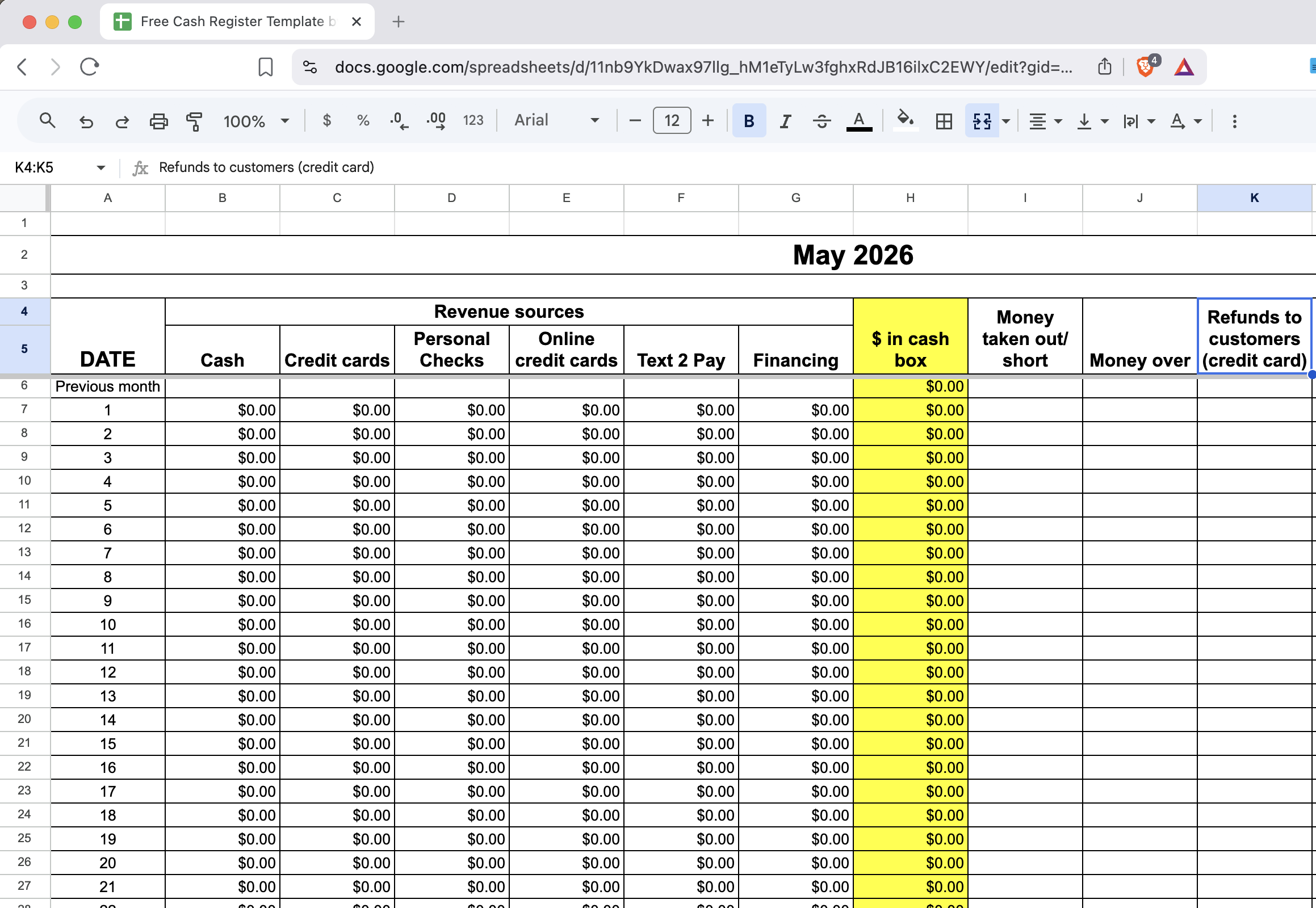
Each day, start a new row that corresponds to the date. For example, June 5th uses the row labeled "5".
At the end of the day, count revenue from all sources and enter it into that day's row. Double-check that the value you entered matches your other tracking sources and management systems.
- Money taken out / short: If you take cash out for deposit or a safe, enter the amount here. A positive number lowers the cash remaining in the register.
- Money over: If you have more cash than what your revenue sources account for, record the surplus here.
- Refunds to customers (credit card): Record any credit card refunds issued to customers in this column.
- Team member initials: The person conducting the end-of-day recording should enter their initials.
- Manager initials: If a manager is overseeing the recording or withdrawing money for deposit, they should record their initials here as well.
You can see a completed example in the May 2026 (example) tab.
How to Audit Results
Google Sheets automatically tracks every change made to the spreadsheet. You can find the full history at File > Version History. From there, you can see which employee made which change, and when, across the entire life of the spreadsheet.
This is useful, but it has real limits — reviewing a revision history is not the same as a structured audit log.
When a Spreadsheet Isn't Enough
The spreadsheet works well at small scale. As your operation grows, you'll start running into the same problems most businesses hit with spreadsheet-based cash tracking:
- User costs add up quickly. Each team member needs a Google Workspace account for individual accountability, which costs more than $10 per user per month on its own.
- Auditing is laborious. Finding a specific change requires scanning through revision history one entry at a time, rather than looking down a column of structured audit entries.
- Access controls are limited. You can lock down sheets or cells in Google Sheets, but the options are limited and complex to maintain reliably as your team changes.
- Cross-month reporting is hard. Because each month lives on a separate tab, rolling up data across months requires manual work or custom formulas.
- Fraud risk is higher than it looks. A determined bad actor can manipulate a shared spreadsheet in ways that are hard to detect without a proper audit trail.
- Any customization requires Google Sheets expertise. Making structural changes — new columns, updated formulas, layout changes — requires someone who knows Sheets well enough to do it without breaking the calculations downstream.
RevenueRegister is built specifically to solve these problems, with a workflow designed around how cash actually moves through a business — from opening count to blind close, variance tracking, and a full audit trail that doesn't require digging through revision history.
Ready for Something More Powerful?
When your business outgrows a spreadsheet, RevenueRegister gives you structured cash controls, blind counting, variance tracking, and a full audit trail — across every drawer and shift.
Start Your Free 14-Day Trial